

Retail construction check-ins: why paper breaks at scale
If you run retail construction or remodeling programs, you already know the pattern: as soon as projects spread across multiple sites (and multiple shifts), the clipboard becomes a liability.
Paper sign-in may feel “simple,” but it creates real problems when you need consistent records across many locations:
- Who was onsite today—and which subcontractor were they with?
- Did they check out? If not, what hours get reported?
- Can the team find documentation fast when questions come up about access, incidents, or compliance?
- How much time is being burned re-keying daily data into spreadsheets or project systems?
The good news: modernizing check-in does not need to mean expensive hardware, complicated IT projects, or training every worker on a new app.
The retail construction “reality” your check-in workflow has to handle
Retail construction and remodeling programs are different from a typical one-off project:
1) Strict client requirements (access + ID + safety)
Many retail owners require stronger onsite controls—often including badge visibility, defined jobsite access points, and consistent recordkeeping.
2) Workforce data that supers need (beyond “name + time”)
Field teams often need to confirm workforce documentation and compliance details—think items like I9/W9 status, background checks, or other required onboarding elements—especially when crews rotate.
3) Off-hours shifts and overnight work
Night work, early starts, and shifts crossing midnight can make “who worked when” surprisingly hard to document cleanly.
4) Multiple sites and traveling supers
When supers bounce between sites, they need consistent, fast, reliable ways to get onsite visibility without chasing paper logs.
5) Daily reporting pressure (and Procore reality)
Retail programs typically have higher reporting expectations. The challenge isn’t just capturing check-ins—it’s turning that activity into daily logs and shareable reports, often inside systems like Procore.
What a “standardized” retail jobsite check-in workflow looks like
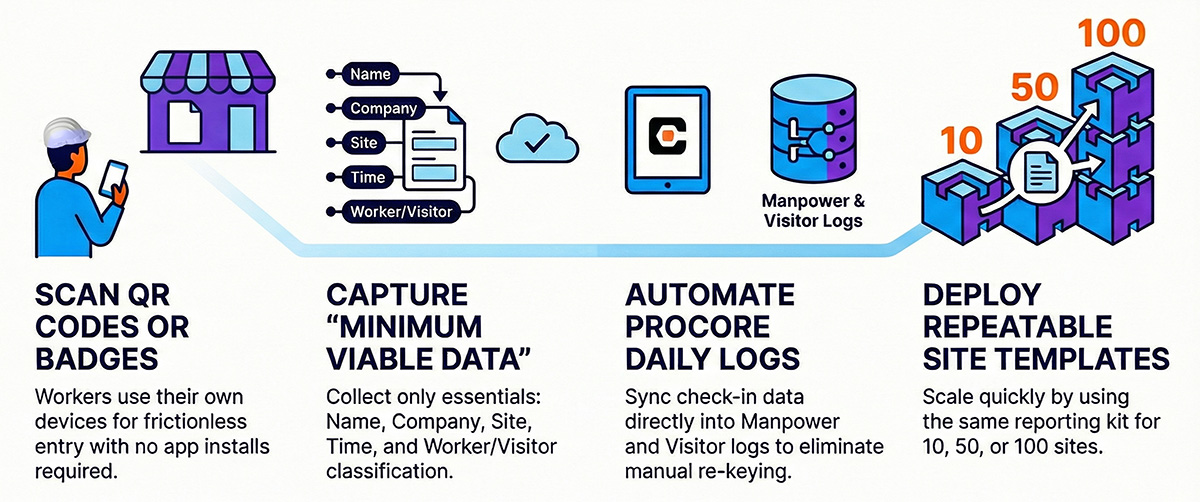
A scalable check-in process has two jobs:
- Make it frictionless for the field
- Produce clean, consistent jobsite data you can trust
A practical modern workflow usually includes:
Option A: QR code poster check-in (fastest deployment)
- Post a QR code at the jobsite entrance
- Workers scan with a phone and complete check-in quickly
- No shared devices required
Option B: Badge-based check-in (stronger access control)
- Workers use digital or printed badges
- Badges are scanned with an internet connected device
- Supports more standardized onsite identification and access control
This is exactly the approach used in Safe Site Check In’s retail solution: deploy quickly using QR posters or badges and the devices people already carry, with no IT-heavy rollout. See the full workflow here: Retail Construction / Remodeling Check-Ins.
What data should you capture for retail construction (minimum viable set)
To be useful for operations, compliance, and daily reporting, retail jobsite check-in should capture more than “John was here.”
At minimum, a strong workflow captures:
- Person name
- Company / subcontractor name
- Check-in time
- Check-out time (or a defined fallback policy if someone misses checkout)
- Site/location identification
- Visitor vs. worker vs. vendor classification
Once you have this baseline, you can layer in what your retail owner requires (hazard awareness prompts, access rules, or additional onboarding fields).
For what “good” looks like on workforce visibility, see: Workforce Management Data.
Procore manpower logs and visitor logs: where most teams lose time
For many retail GCs, the biggest hidden cost isn’t the check-in itself—it’s the manual data entry afterward:
- Someone has to interpret handwriting
- Someone has to clean the data
- Someone has to update manpower logs and visitor logs
- Someone has to answer questions when a record is missing
If your team is already in Procore, the key is avoiding duplicate data entry while still capturing accurate onsite activity.

Safe Site Check In’s retail solution page highlights Procore support including:
- Making subcontractor and worker data from Procore available to foremen without requiring each worker to be created as a Procore contact
- Capturing and syncing manpower and visitor log data on a schedule, including “end of shift” syncing language on the live page
If Procore is central to your daily reporting, review: Procore Integration.
Handling multiple shifts and overnight work without creating reporting chaos
Retail construction often includes multiple shifts in a day and overnight work that crosses midnight. Any check-in system you choose should handle these realities without turning reporting into a manual mess.
A practical approach is:
- Capture check-in/checkout timestamps per individual
- Use a scheduled sync approach for reporting (often once daily)
- Define a clear policy for missed checkout (for example: default hours used at reporting time)
This is called out directly on the retail solution page, including the nuance that Procore manpower logs are commonly updated on a scheduled basis (often once per day) and that default hours may be used if checkout hasn’t been recorded at update time.
If your projects run night shifts or frequent shift changes, make sure your demo includes a “shift pattern” walkthrough (day/night/overnight) so the workflow fits your program.
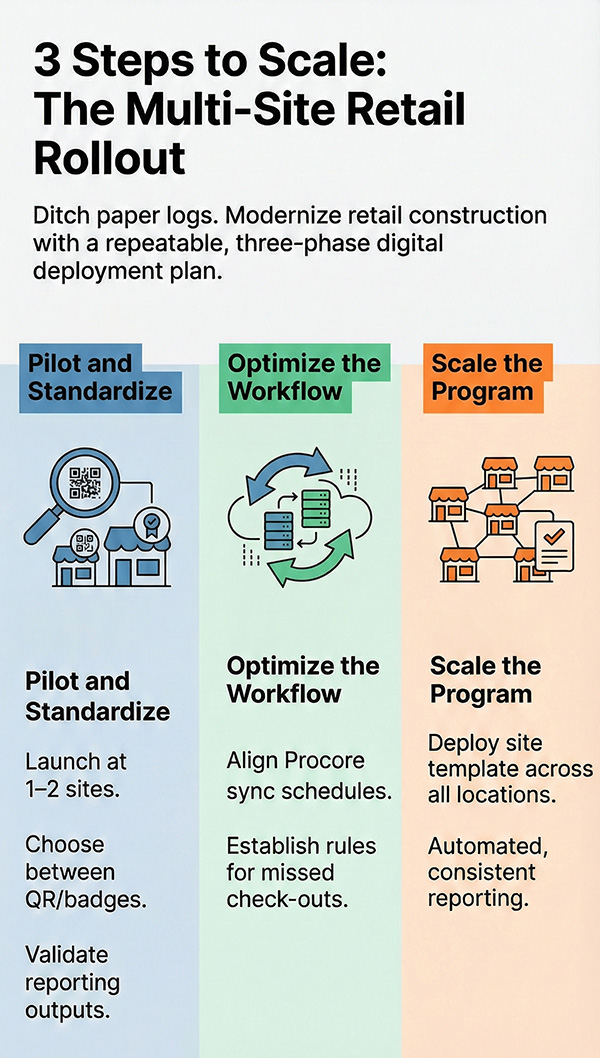
A simple rollout plan for multi-site retail programs (that won’t stall in IT)
- Minimal hardware changes
- Minimal training requirements
- A repeatable template applied across sites
A practical phased rollout looks like:
Phase 1: Standardize check-in at 1–2 pilot sites
- Decide QR vs badges (or both)
- Confirm what fields you need (company, role, visitor type, etc.)
- Validate daily reporting outputs
Phase 2: Confirm reporting + Procore workflow
- Validate how often logs need to be synced/reported
- Align on end-of-shift vs scheduled reporting expectations
- Define missed-checkout handling
Phase 3: Scale across your retail program
- Roll out site-by-site using the same template
- Give traveling supers consistent processes and dashboards
- Set reporting schedules so logs arrive automatically
What to look for in a retail construction check-in solution
If you’re evaluating tools, prioritize outcomes over feature lists. For multi-site retail programs, the highest-impact criteria are:
- Deploys in minutes (not weeks)
- Doesn’t require new devices for every site
- Supports QR and/or badge workflows
- Provides real-time onsite visibility
- Produces audit-ready logs (workers + visitors + vendors)
- Automates daily reporting (spreadsheet/PDF)
- Has a realistic Procore workflow (manpower + visitor logs)
For a feature overview, see: All Features and Benefits and Digital Badging and Onboarding.
Where Safe Site Check In (SSCI) fits
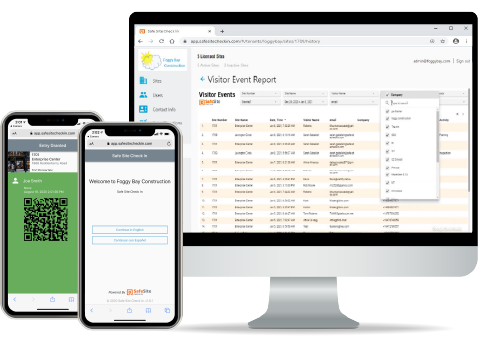
SSCI helps retail GCs and program managers replace messy paper sign-in sheets with a standardized digital workflow across every site—supporting real-time “who’s on site” visibility, automated Procore manpower logs, and audit-ready reporting for retail owners.
Explore the solution: Retail Construction / Remodeling Check-Ins
Ready to ditch the paper logs for a smarter, faster retail workflow
Learn how Safe Site Check In can help you modernize your retail construction and remodeling projects with digital badging, real-time onsite visibility, automated reporting, and Procore manpower + visitor log data capture.
Frequently Asked Questions
Do workers need to install an app?
Look for systems that work without requiring app installs for every worker. SSCI supports QR-based check-in that can be accessed via a phone.
Do we need expensive hardware to get started?
Ideally, no. Retail rollouts move faster when the system uses QR posters or badges and the devices teams already have.
How do we keep daily reporting consistent across many sites?
Standardize the workflow, automate reporting, and ensure your system produces logs that are easy to share and/or integrate with Procore.

Our Safe Site Check In web app can Make Jobsite Management Easy™. SSCI automates check-in with safety screening, badging, onboarding and daily log creation. Our solution has been used on thousands of sites for millions of screenings in construction and other industrial worksites by thousands of employees and visitors every day. Used worldwide, built and supported in the USA.