

Most construction teams already have some jobsite data from daily check-ins, subcontractor presence, and timecard data. But it is usually only used for compliance. Trapped on paper clipboards or in spreadsheets, jobsite data is filed away and only gets examined when there’s an incident.
Yet jobsite data is the most actionable real-time data for project management. If you’re not using your jobsite data with AI, you’re missing a huge opportunity to improve project outcomes.
The good news: you don’t need a data science team. You need (1) a digital check-in data process and (2) an AI-assistant to match that data to your project schedule and analyze the critical path.
This guide lays out exactly how to do that—starting today—using construction check-in data like the data Safe Site Check In captures every day.
We’ll use a real-world anonymized example dataset throughout (2,716 check-ins across 20 job sites, 262 unique workers, and 103 companies) to show what AI can surface quickly and reliably.
Short on time? Watch this video for a quick recap on using AI to analyze construction check-in data:
Step 1 — Treat check-in data as a business system (not a compliance log)
Many firms treat check-ins as a safety/compliance artifact: “Who was on site?” That’s necessary—but it’s not sufficient.
When check-in data is structured and consistent, it becomes a management signal for:
- schedule confidence (are the right trades showing up at the right time?)
- subcontractor reliability (who is consistent, who is not?)
- operational load (which projects are consuming the most labor presence?)
- risk (peak occupancy, missing check-outs, credential gaps)
What “good” check-in data includes:
- Timestamped check-in and check-out
- Company/subcontractor name
- Project/jobsite identifier
- Role, trade, or activity tag (even broad categories are fine)
Where Safe Site Check In fits: Safe Site Check In is designed to capture this information consistently at the point of entry—so your workforce data is usable for AI analysis, not just filed away.
Step 2 — Fix the two data issues that break AI analysis
AI can summarize, classify, and spot patterns fast—but only if your data is consistently captured.
In our example dataset, AI surfaced two immediate issues that are extremely common in construction:
1) Check-out compliance is low (and it’s more than an admin issue)
In the dataset, 81.7% of check-ins had no check-out recorded. That single gap undermines multiple high-value use cases:
- You can’t reliably estimate hours-on-site
- You can’t validate occupancy windows
- You can’t produce credible “who is still on site?” accountability in an incident
Operational fix: Make check-out part of the process, not an afterthought. If check-out completion is low, you’ll still get value from check-in trends—but you’re leaving the highest-confidence time and utilization insights on the table.
2) Company names aren’t standardized (which fragments reality)
The dataset also contained duplicate company entries due to spelling variants (e.g., one subcontractor appearing under multiple near-identical names). AI can detect and suggest merges, but you’ll get better reporting if you standardize the source labels early.
Operational fix: Establish a standardized company list (and enforce it at check-in). This is a quick win that improves every downstream report.
Step 3 — Ask the right questions (the “executive layer” of AI)
AI doesn’t create value by existing—it creates value by answering questions that influence decisions.
Here are high-impact questions AI can answer from check-in data that matter to Project Managers, Owners/Executives, and Operations/Workforce leaders.
Questions for Project Managers (schedule + execution)
-
- Are we ramping workforce ahead of critical work—or declining when we should be accelerating?
- Which trades are consistently present, and which are missing for the current phase?
- Are we truly “inspection ready,” based on recent field activity patterns?
In our dataset, one of the most useful signals was workforce trend direction—daily headcount declining during a window where upcoming tasks and inspections required momentum. That’s a schedule risk indicator you can spot early, not after a milestone slips.
Questions for Owners/Executives (margin + risk)
-
- Which job sites account for the majority of field presence (and therefore management attention)?
- Which subcontractors represent outsized dependency?
- Where will supervision/PM burn become a margin problem if the schedule slips?
In the example dataset, three sites dominated total check-ins (a “site concentration” pattern). Executives can use that to focus risk reviews and ensure the highest-load projects have the right operational support.
Questions for Ops/Workforce (reliability + utilization)
-
- Which subcontractors show inconsistent attendance patterns?
- What are our peak occupancy windows by project/day?
- Who are the most-utilized individuals—and are we creating single points of failure?
AI can also quickly highlight schedule norms. For example, the dataset showed 49.9% of check-ins happening before 6:00 AM, reflecting early-start field schedules—useful for planning coverage, safety presence, and site coordination.
Step 4 — Run a weekly “AI workforce review” (30 minutes)
This is where companies separate into two groups: those who “use AI sometimes,” and those who build a repeatable advantage.
Set a recurring meeting and make it simple.
Inputs (weekly):
- Last 7–14 days of Safe Site Check In export or reporting summary
- Basic project phase context (rough-in vs finish, inspection windows, etc.)
Outputs (every week):
1) Headcount trend by site (rising, flat, falling)
2) Trade/activity mix shift (are the right trades showing up?)
3) Anomaly flags
– missing check-outs spiking
– unusual weekend activity
– a key subcontractor suddenly dropping off
4) Subcontractor concentration and dependency
5) A 5-bullet exec summary you can paste into an email update
Where Safe Site Check In fits: Because SSCI structures check-ins consistently, you can produce a dependable weekly export and build this review into an operating rhythm—without chasing down fragmented spreadsheets.
Step 5 — Tie check-in insights to schedule and cost (where AI becomes a leadership tool)
Check-in insights are useful on their own. But they become powerful when connected to schedule gates and cost exposure.
Here’s the pattern you want AI to help you spot early:
- Gate item is due (inspection, turnover, finish-trade handoff)
- Workforce trend is declining or staying flat
- Supporting trade activity is too light to justify “we’re ready”
- Result: schedule risk → extended supervision/PM burn → margin erosion
This is why AI on check-in data isn’t just “reporting.” It’s early detection.
And that matters because construction remains slow to implement AI broadly—meaning there’s real advantage for teams that operationalize it now. For example, one industry survey cited by ASCE found only 27% of AEC respondents are using AI, but 94% of those adopters plan to increase usage in 2026—classic early-adopter leverage if you build the habit before everyone else does (ASCE). Another survey summarized by Construction Dive reported 45% of firms have no AI implementation and 34% are only in early pilots (Construction Dive).

A quick note on responsible AI and workforce data
Use AI as an assistant—not as an unchecked decision-maker.
- Keep your prompts focused on operational patterns (trends, anomalies, readiness signals)
- Avoid using AI to make individual employment decisions
- Limit data access to appropriate stakeholders
- Maintain clear audit trails for exports and summaries
The goal is better decisions and safer, more predictable operations—not “black box” management.
Want to operationalize this across every project? Book a Safe Site Check In demo
If your team isn’t consistently capturing structured check-ins or you want to turn check-in data into repeatable workforce intelligence, schedule a free 15-minute demo.
Safe Site Check In helps you create the data foundation for AI-enriched analysis: consistent worker and subcontractor site presence, role/activity tagging, and the reporting exports needed to build a weekly operating rhythm.
Because if you’re not analyzing your workforce data with AI, you’re not just missing insights—you’re handing a competitive edge to the firms who are.
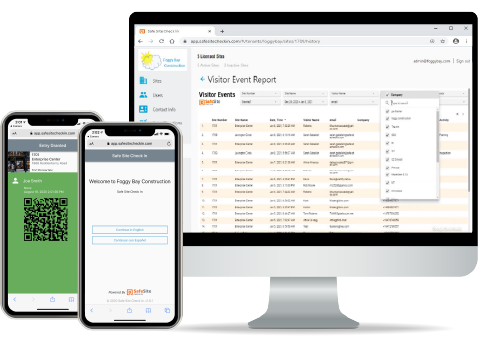

Our Safe Site Check In web app can Make Jobsite Management Easy™. SSCI automates check-in with safety screening, badging, onboarding and daily log creation. Our solution has been used on thousands of sites for millions of screenings in construction and other industrial worksites by thousands of employees and visitors every day. Used worldwide, built and supported in the USA.