

Finding the Right Tech for Your Gate
Executive Overview: The HQ / Jobsite Data Gap
Most General Contractors have a high-level project management system for HQ, but their project jobsites are still analog. The result is an information gap between the office’s systems of record and the field’s real-time reality.
While the goal of a paperless construction jobsites has existed for decades, it’s rarely been achieved. As the older generation of field managers retire, their successors are generally digital natives who consider paper forms “backward”. Especially true now that we all have AI expertise available from our smartphones.
This guide compares four primary categories of digital jobsite technology—including specialized safety platforms—to help Project Managers and Executives choose the right tools for their specific project needs.
General requirements vary widely based on the type of building and its size and complexity. There is rarely a single solution for a GC’s entire portfolio of projects, large & small, commercial and residential, even if the GC specializes in just one type of building.
For example, retail store, healthcare, data center, military and K12 projects often have high access control requirements, up to and including biometric identification and video monitoring. Industrial and vertical structures will have higher safety requirements. Any project with a large number of workers and subs will have higher financial, risk and compliance requirements.
But many small projects may be self-managed solely by a senior tradesmen. So mixing & matching tools to individual projects remains the norm for most GCs.
The 2026 Jobsite Tech Comparison Matrix
(Click image to enlarge)
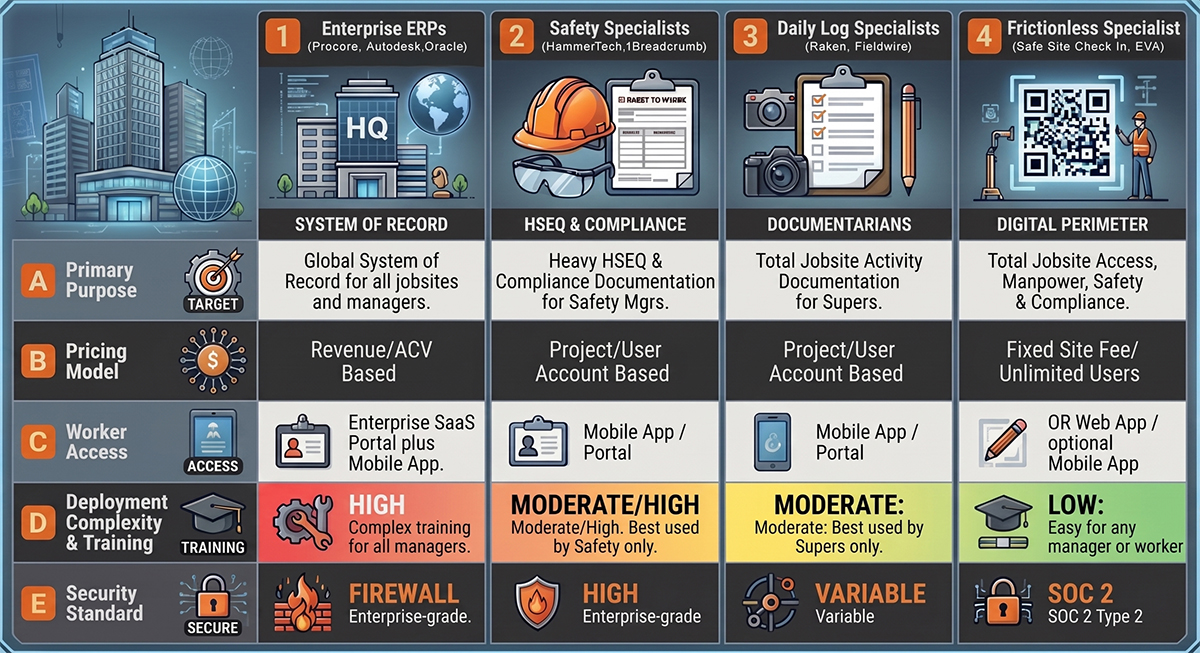
Category 1: The Enterprise Platforms (Procore, Autodesk Construction Cloud, Oracle Aconix)
The “System of Record” These platforms are the foundation of project governance, work and resource plans, RFIs, submittals, and financial records.
Pricing: Based on Annual Construction Volume (ACV).
The Verdict: Essential for the back-office, but often inaccurate for real-time manpower tracking due to high field friction and app-download barriers. Best used with an integrated mobile safety, daily log or check-in app to collect field data.
Category 2: Safety & Compliance Specialists (HammerTech, 1Breadcrumb)
The “Compliance Heavyweights” Specialized platforms designed to manage high-risk activities, site inductions, and health and safety (HSEQ) workflows.
The Strength: Deep compliance tools like permit management, worker orientations, and incident reporting. They are built for rigorous HSEQ oversight.
The Challenge: High barrier to entry for temporary labor. Tools like HammerTech often require significant data entry and “app/portal” registrations that can slow down the morning rush. 1Breadcrumb offers mobile-first orientations but requires more interaction than a simple site check-in.
Pricing: Typically Project or User Volume-based, often starting with annual platform fees (e.g., ~$10,000/year for 1Breadcrumb).
The Verdict: Critical for high-risk sites requiring heavy HSEQ documentation, but they often lack the frictionless “Gate Speed” of SSCI.
Category 3: Daily Log Specialists (Raken, Fieldwire)
The “Documentarians” Tools focused on improving the quality of field reports and photo documentation.
Pricing: Per User / Per Seat, often starting with annual platform fees.
The Verdict: Excellent for Superintendents, but the per-seat cost makes it too expensive to track 100% of the workforce, leading to manual “guesstimates” in daily logs.
Category 4: The Frictionless Specialist (Safe Site Check In, EVACheckin)
The “Digital Perimeter” Safe Site Check In focuses exclusively on the point of entry, prioritizing 100% worker data capture through zero-friction QR scans and digital badging. Ease of use and deployment is everything.
The Strength: 100% Adoption. No apps, no logins required except for managers. Workers scan, acknowledge hazards, and get to work in seconds.
Integration Edge: Complements system of record to flag when a sub’s “Promise” (contracted labor) doesn’t match their “Presence” (actual check-ins).
Pricing: Per Active Site. Fixed fees of $99–$299+/month per site based on #check ins with unlimited #users.
The Verdict: Captures real-time jobsite identity, access, manpower, & safety orientation data for use by systems of record.
The 2026 Jobsite Tech Features Comparison
| Feature | Enterprise ERPs (Procore, Autodesk, Oracle) | Safety Specialists (HammerTech, 1Breadcrumb) | Daily Log Specialists (Raken, Fieldwire) | Frictionless Specialist (Safe Site Check In, EVA Checkin) |
|---|---|---|---|---|
| Primary Purpose | Global System of Record for all jobsites and managers | Heavy HSEQ & Compliance Documentation for Safety Mgrs | Total Jobsite Activity Documentation for Supers | Total Jobsite Access, Manpower, Safety & Compliance |
| Pricing Model | Revenue/ACV Based | Project/User Account Based | Project/User Account Based | Fixed Site Fee/ Unlimited Users |
| Worker Access | Enterprise SaaS Portal plus Mobile App | Mobile App / Portal | Mobile App / Portal | QR Web App / optional Mobile App |
| Deployment Complexity & Training | High: Complex training for all managers. | Moderate/High: Best used by Safety only. | Moderate: Best used by Supers only. | Low: Easy for any manager or worker. |
| Security Standard | Enterprise-grade | Enterprise-grade | Variable | SOC 2 Type 2 |
Why “Better Together” with Safe Site Check In is the Winning Strategy
Rarely will one app do everything, so a Best-of-Breed with Integration strategy is optimal:
- Safe Site Check In captures the raw check-in data at the gate quickly and easily by all workers and visitors, employees, subs, inspectors – everyone.
- Integration pushes that data into Procore/Autodesk system of record.
- The Result: 100% real-time data and compliance records at the least cost.
For a customized demo, visit www.safesitecheckin.com.

David Brian Ward is a CEO and Founder of Safe Site Check In LLC, a digital jobsite management platform launched in 2020 for the Construction industry. With over 40 years of experience in the technology industry, having launched and grown several successful companies. Mr. Ward is a now a SaaS entrepreneur and innovation leader in the Construction industry.