
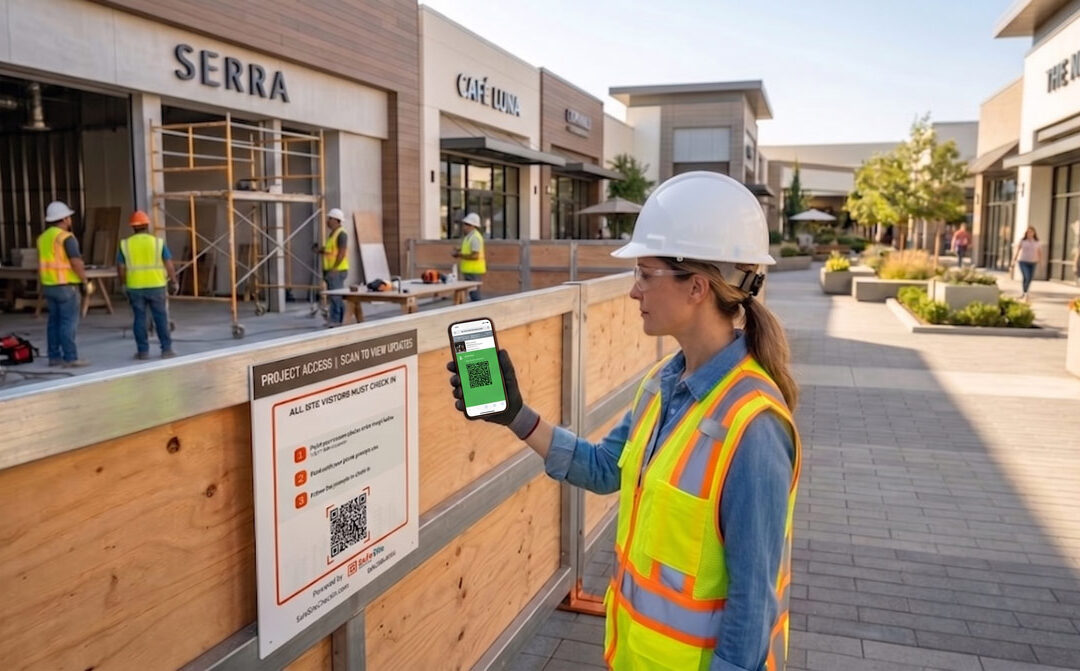
You’re a Superintendent overseeing a retail store renovation. In addition to the construction itself, you are responsible for trade worker access control, safety orientations, and compliance recordkeeping. And your Project Manager wants daily manpower updates for his software, your Safety Manager wants proof his safety plans are followed, and your Construction Executive wants to assure the project owner that everything’s hunky-dory.
Whether executing open-store renovations around active shoppers or managing compressed, off-hours rollouts, retail store field teams can’t afford the delays and cost of paper clipboards and manual data entry. They lead to gate congestion, unverifiable progress, poor subcontractor management, compliance gaps, and anxious project owners.
Safe Site Check In (SSCI) offers an easy-to-use, cloud-managed digital check-in webapp engineered specifically for the Superintendents leading retail renovation projects for even the most demanding big-box retailers. Here’s how digitizing retail jobsite check-ins addresses the core challenges:
Role-by-Role Digital Data Management Capabilities
(Click image to enlarge)
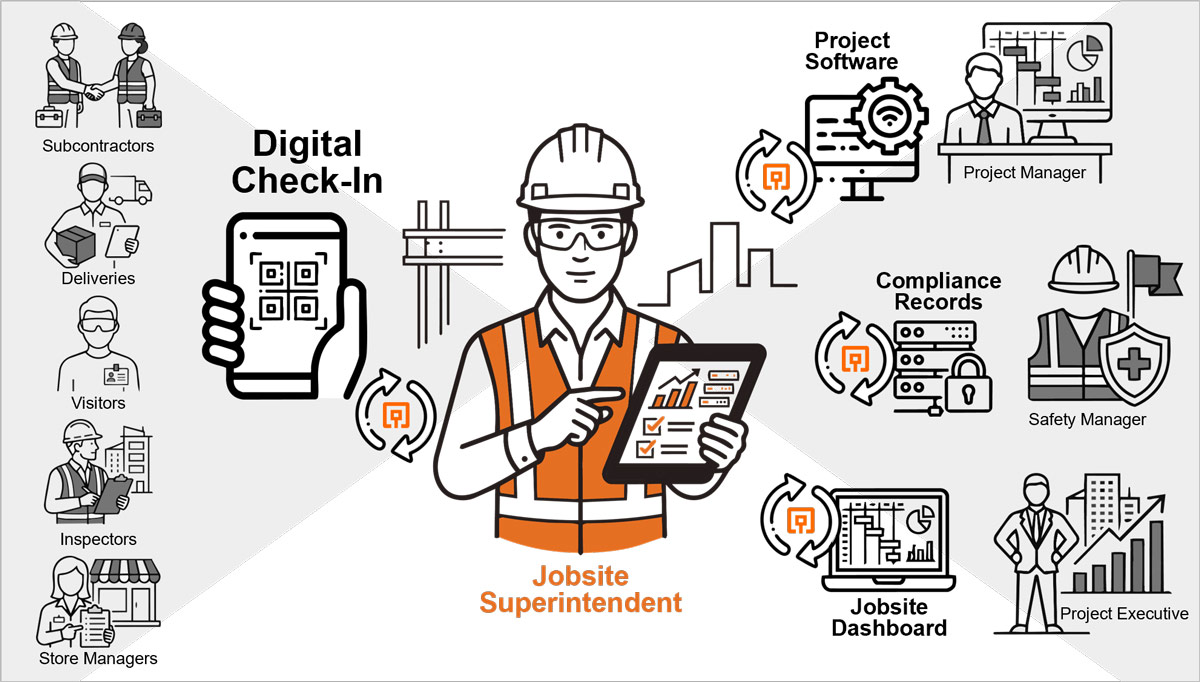
How Digital Check In Automates Project Data Capture
When managing a multi-site retail renovation across multiple stores, Project Executives balance fast-track schedules, strict trade sequencing, and rigid grand opening dates. Because much of the work can happen during overnight shifts, tracking trade attendance and actual hours is essential for cost control. Relying on paper logbooks or spreadsheets leads to unverifiable subcontractor billings, schedule slippage, and hours spent manually wrangling data into management software every day.
- Digital Badging: SSCI create photo badges that are associated with all the data required by even the most demanding big box stores.
- Safety Plan Compliance: Jobsite check-in via QR codes requires workers to acknowledge safety risks and jobsite behavior rules and records their compliance in
- Automated Procore & Autodesk Construction Cloud (ACC) Syncing: SSCI connects directly with Procore and ACC capturing verified attendance and trade hours.
- Portfolio-Wide Visibility: Gives Project Executives a real-time, centralized overview of active labor across every store location, eliminating manual data entry.
- Observation capture: Annotate the daily log via voice, text or camera.
How Digital Check In Eliminates Gate Bottlenecks and Shift Handoffs
On an open-store remodel, physical space is limited, and paper sign-in sheets at access points create entry delays for the trades. Superintendents must coordinate shift handoffs from overnight crews while managing visits from non-construction personnel—such as retail employees arriving for point-of-sale training. Keeping access control and accurate manpower logs while maintaining active construction momentum requires digital check-ins.
- Zero-App QR Check-In: Supervisors post weather-resistant QR code posters at site entrances. Workers scan the code with their smartphone camera to check in via a standard web browser, requiring no native app downloads, registration loops, or special training.
- Digital Badging: Major retailers requires workers have photo badges associated with their trade credentials that can be scanned like boarding an airplane.
- Automated Visitor Alerts & Risk Waivers: Workers and visitors during check in review safety rules and sign digital waivers. SSCI automatically sends an SMS notification to the supervisor’s phone the moment non-construction visitors arrive or exceptions occur.
- Night Shift Handoffs & Exit Prompts: Automatically logs check-out times for off-hours crews and presents custom checkout prompts—such as confirming Lockout/Tagout (LOTO) status or shift safety issues.
How Safety Managers Enforce Orientations and OSHA Compliance in Active Retail Stores
Managing safety during an open-store renovation requires keeping construction zones clearly separated from store employees and shoppers using containment barricades and dust controls. Allowing an uncertified worker into a restricted work area without verifying site-specific orientations is risky. If an incident occurs on site, relying on unreadable paper forms makes it difficult to maintain the clear audit trail required for regulatory review and legal defense.
- Mandatory Entry Screening & Orientations: Enables safety managers to set up automated check-in forms and digital badges that require workers to confirm trade certifications, watch site-specific orientation videos, and acknowledge hazards before site access is granted in their native language.
- Real-Time Incident Logs & Text Broadcasts: Captures incident reports directly in the cloud for immediate, permanent and secure documentation. In an emergency, safety managers can instantly broadcast text alerts to everyone currently on site.
Why Construction Executives Need Centralized Cloud Data to Protect Margins Across Multi-Site Rollouts
Executives overseeing nationwide retail accounts require standardized field oversight to assure consistency with customer requirements, protect profit margins, control risks, and safeguard customer satisfaction and reputation. Inconsistent paper tracking methods across decentralized job sites creates operational blind spots, increasing exposure to contract disputes, labor compliance issues, and unverified job costs.
- Centralized Cloud Reporting: Unifies site data across all active projects into a single cloud dashboard, offering executive leadership macro-level visibility into daily headcounts, trade hours, and compliance activity.
- Risk Mitigation & Custom Branding: Maintains secure digital records that serve as reliable audit documentation for invoice, insurance and wage reviews, while incorporating company branding and safety messaging on check-in posters and digital badges.
Trade Crews Check In Fast Without App Store Downloads
Trade crews scheduled for overnight shifts need to maximize active working time. Waiting in physical lines to fill out paper clipboards—or being forced to download, configure, and troubleshoot mobile apps on personal phones—wastes valuable shift hours and creates friction for field personnel.
- Subcontractor Delegation: General contractors email secure onboarding links directly to foremen, enabling them to pre-register their crews, batch-load trade licenses, and issue digital badges before stepping foot on site.
- Frictionless Mobile Interface: Trade workers simply scan the entry QR poster or present a digital badge saved on their phone’s browser, completing check-in in under 30 seconds with standard English, Spanish and other languages.
IT Managers Capture Enterprise Data Securely Without Downloads or Local Device Risk
Introducing new software across multiple retail job sites often creates heavy deployment overhead: upgrading hardware, managing app store accounts, user licenses, and supporting a wide variety of personal devices. Storing worker or project records locally on paper or field tablets also introduces data security risks.
- Zero IT Deployment Overhead: SSCI deploys instantly across any number of sites without native app downloads, store payments, or dedicated hardware—running smoothly in any smartphone web browser. You only need internet access.
- Encrypted Cloud Security: All data is stored securely in the cloud in real time using Google-managed single sign-on and role-based access control (RBAC), ensuring private records are permanently protected and never stored on local devices.
Operational Comparison: Manual Methods vs. Safe Site Check In
| Key Workflow | Manual / Paper Tracking | Safe Site Check In (SSCI) | Benefiting Roles |
|---|---|---|---|
| Site Deployment | Purchasing physical kiosks or setting up paper clipboards. | Deploy in minutes by printing weather-resistant QR code posters. | Site Supervisors, IT Managers |
| Management System Sync | Re-keying paper entries manually into spreadsheets. | Automated 30-minute integration with Procore and ACC. | Project Managers, Administrators |
| Crew Onboarding | Entry gate lines and manual paper forms. | Subcontractor foremen pre-register crews digitally. | Subcontractor Foremen, Supervisors |
| Safety Conformance | Unverified physical sign-in sheets. | Mandatory digital JHA, orientation video & LOTO prompts. | Safety Managers, Supervisors |
| Multi-Site Oversight | Physical travel to inspect daily manpower presence. | Centralized, real-time cloud management dashboard. | Construction Executives, PMs |
4 Steps to Streamlining Retail Remodel Check-Ins and Shift Handoffs
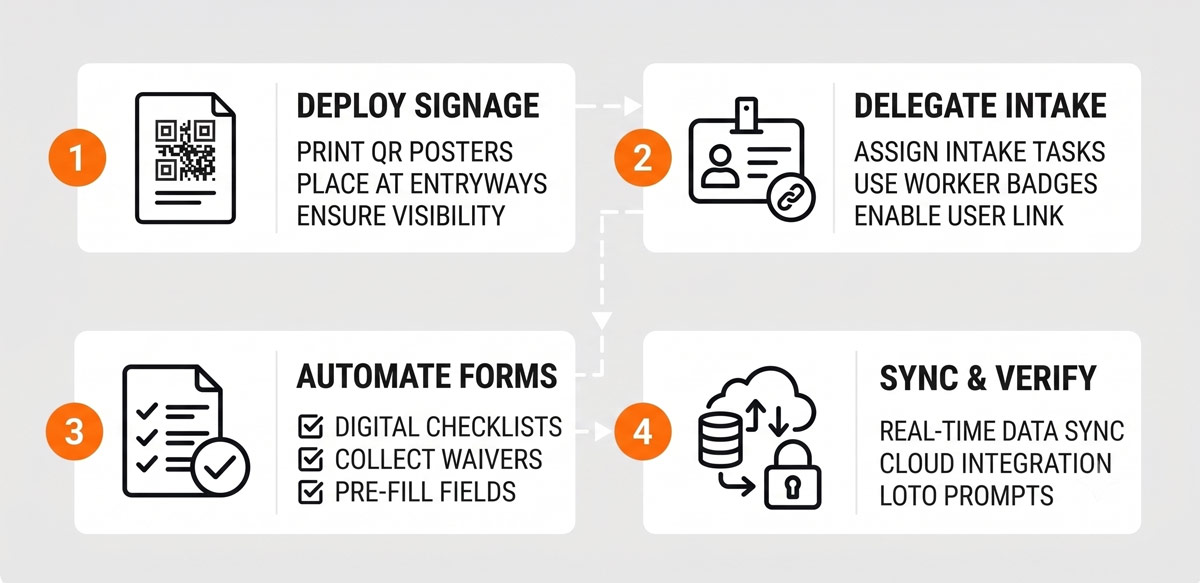
- Deploy Perimeter Signage: Print project-specific QR code posters from the SSCI management dashboard and mount them at access gates, laydown zones, or store containment barricades.
- Delegate Subcontractor Intake: Email secure profile links to subcontractor foremen before field work begins. Foremen pre-load worker rosters including required trade licenses and certifications prior to arriving on site.
- Automate Entry Screening & Waivers: Configure gate scans to present site safety orientations for trade workers, and require digital risk waivers for visiting retail store employees and merchandisers.
- Enable Cloud Syncing & Departure Prompts: Connect SSCI to Procore or ACC to auto-populate daily manpower logs. Set custom checkout prompts requiring night crews to confirm LOTO lockdown before checking out.
Modernize Your Retail Project Operations
Superintendents want to build, not process paperwork. Stop letting paper logbooks, entry bottlenecks, and unverified manpower tracking compromise your project schedules and profit margins. Discover how Safe Site Check In streamlines jobsite management for every role on your construction team.

Our Safe Site Check In web app can Make Jobsite Management Easy®. SSCI automates check-in with safety screening, badging, onboarding and daily log creation. Our solution has been used on thousands of sites for millions of screenings in construction and other industrial worksites by thousands of employees and visitors every day. Used worldwide, built and supported in the USA.